
Plasma widget
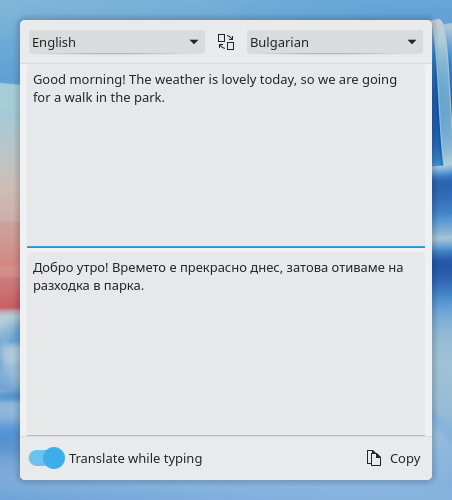
The Offline Translator widget translates text from the Plasma panel or the desktop, without opening an application. Click its icon, choose the languages and type or paste; the translation appears in the popup.
It is developed as its own project,
dragoman-plasmoid, and
packaged as dragoman-plasmoid in the same repository as Dragomand.
Requirements
Dragomand. The widget talks to the daemon over D-Bus. The package
depends on dragomand. The widget never starts the daemon by itself:
nothing is asked of it before you open the popup.
KDE Plasma 6.3 or newer.
Install
Add the Dragomand repository first, as described on the
Install page, then install the dragoman-plasmoid package:
sudo zypper install dragoman-plasmoidsudo dnf install dragoman-plasmoidsudo apt install dragoman-plasmoidsudo pacman -S dragoman-plasmoidPlasma loads widgets when it starts, so log out and back in once. Then right-click the panel or the desktop, choose Add or Manage Widgets, and add Offline Translator.
Using it
- Translate. Choose the two languages and type or paste text. It is translated after a short pause, or with Ctrl+Return when Translate while typing is off. Empty lines and the layout of the text are kept.
- The direction follows the text. When the text is in the target language, the widget swaps the languages, says so, and offers to swap them back. The settings page can turn this off.
- Missing pairs. A language pair that is not installed yet is never downloaded behind your back: the widget offers an Install button, with progress and a way to cancel.
- Copy, or continue in Krakoman. The translation can be copied, or opened in Krakoman when it is installed.
The last languages and the "Translate while typing" switch are remembered. Right-click the widget and choose Configure to set them in advance.
Build from source
Building needs CMake 3.24, extra-cmake-modules, Qt 6.8, KDE Frameworks
6.13 (Config, CoreAddons, I18n), libplasma 6.3 and
libdragoman-qt. From a dragoman-plasmoid
checkout:
cmake -S . -B build -G Ninja -DBUILD_TESTING=ON
cmake --build build
ctest --test-dir build
sudo cmake --install build
plasmoidviewer from plasma-sdk shows an uninstalled build:
QT_PLUGIN_PATH=$PWD/build/bin plasmoidviewer -a dev.l10n_bg.dragomand.translatorTroubleshooting
Offline Translator is not in the widget list. Log out and back in after installing the package.
"The Dragomand translation service is not available." or "Cannot
reach the Dragomand translation service": check that dragomand is
installed, and check the daemon from a terminal:
dragomanctl statusFor problems with the daemon itself, see Troubleshooting.