
KDE System Settings module
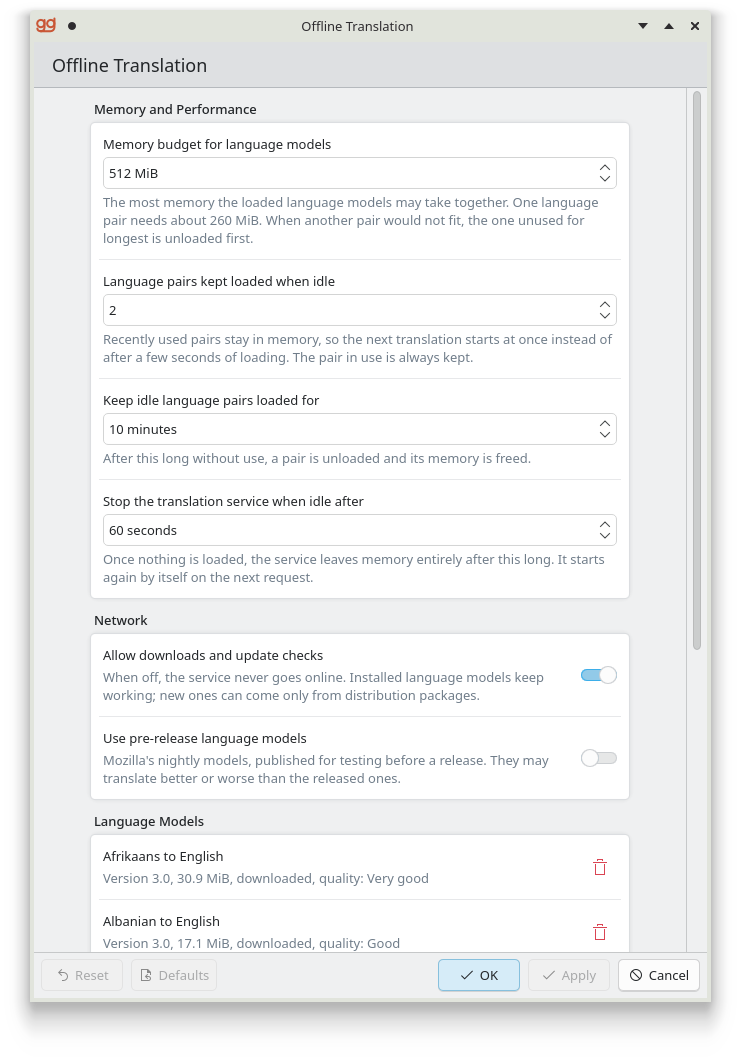
The Offline Translation page of KDE System Settings configures the Dragomand daemon and manages its language models: how much memory the models may use, whether the daemon may use the network, and which language pairs are installed.
It is developed as its own project,
dragoman-kcm, and packaged
as dragoman-kcm in the same repository as Dragomand.
Requirements
Dragomand 0.2 or newer. The page reads and changes the settings
through the daemon, which starts on demand. The package depends on
dragomand. With an older daemon the page says so and disables the
settings, while the language models still work.
KDE Plasma 6 with KDE Frameworks 6.13 or newer. Outside Plasma the
page opens with kcmshell6 kcm_dragomand.
Install
Add the Dragomand repository first, as described on the
Install page, then install the dragoman-kcm package:
sudo zypper install dragoman-kcmsudo dnf install dragoman-kcmsudo apt install dragoman-kcmsudo pacman -S dragoman-kcmOpen System Settings, then Language & Time, then Offline Translation. Searching System Settings for "translation" finds it too.
The page
- Memory and Performance
-
The memory budget for loaded language models, how many recently used pairs stay loaded when idle and for how long, and how soon the daemon leaves memory once nothing is loaded.
- Network
-
Whether the daemon may download models and check for updates at all, and whether it offers Mozilla's pre-release models.
- Language Models
-
The installed pairs with version, size, origin (downloaded, or from a system package) and a quality label derived from Mozilla's scores; models Mozilla has not released yet are marked Experimental. Downloaded copies can be removed. Check for Updates asks the provider for newer models, and Update All installs them with progress. When Krakoman is installed, Manage in Krakoman opens it to install more languages.
- Status
-
The daemon's version, memory in use and loaded pairs. It is fetched when you ask for it, never in the background, because polling would keep an idle daemon from exiting.
Apply sends only the settings you changed. The daemon checks them,
saves them to its configuration file and applies
them at once, without a restart. A change made elsewhere, for example
with dragomanctl config, shows up on the page immediately.
Build from source
Building needs CMake 3.24, extra-cmake-modules, Qt 6.8, KDE Frameworks
6.13 (CoreAddons, I18n, KCMUtils, KIO, Service) and
libdragoman-qt. At run time the page needs Kirigami
and Kirigami Addons. From a dragoman-kcm checkout:
cmake -S . -B build -G Ninja -DBUILD_TESTING=ON
cmake --build build
ctest --test-dir build
sudo cmake --install buildTroubleshooting
The settings are disabled. The daemon is older than 0.2, or it cannot be reached. Check it from a terminal:
dragomanctl status"The settings could not be saved: ..." The daemon checks every value and refused one; the message gives its reason. The limits are listed on the Configuration page.
Offline Translation is not in System Settings. Restart System Settings after installing the package.